Choose a format people can explain in one sentence
The simplest challenge is total steps over a fixed period: whoever records the most steps by the finish wins. A seven-day race is long enough for weekdays and a weekend to matter, but short enough that a slow start does not become a month-long punishment.
For groups with very different routines, consider teams, a collective target or a consistency challenge. Choose one scoring idea for each race. Multiple bonus systems quickly make standings harder to trust.
Agree on five rules before starting
- Exact start and finish time.
- The phone or wearable that supplies the step total.
- Whether manual step entries are allowed.
- How late syncing will be handled.
- What the winner receives—even if it is only bragging rights.
A shared app can remove spreadsheet work, but it cannot replace clear expectations. Keep the rules visible and avoid changing them after someone takes the lead.
Let ordinary walking count
A good step challenge rewards movement without requiring everyone to train like an athlete. Commuting, errands, dog walks and a short evening loop can all contribute. If the group includes people with different abilities or medical limitations, use teams or personal baselines instead of insisting on one absolute target.
Step counts from different phones and wearables can vary. Use one agreed source per person and treat the challenge as friendly motivation, not a precise fitness test.
Create more moments than the final result
A leaderboard is most interesting when positions can change. Small updates—an overtake, a shrinking gap or a friend joining the chase—give the group reasons to check in. WalkBop adds mystery crates and playful items earned through walking, so a race can change without replacing the real step total at its center.
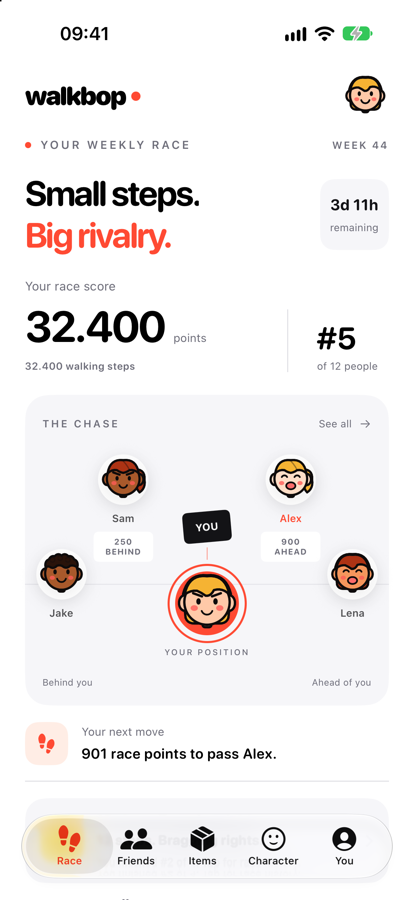
Keep messages encouraging. Celebrate a comeback or a new routine, not only the person with the highest total. Social support and walking groups are recognized ways to support physical activity in the U.S. Physical Activity Guidelines.
Close the race, then reset cleanly
Announce the result at the agreed finish, acknowledge the group, and start fresh. A weekly reset prevents one early lead from becoming permanent. Read the weekly walking challenge guide for a reusable seven-day rhythm.
Sources
- U.S. Department of Health and Human Services: Physical Activity Guidelines for Americans, 2nd edition.
- CDC: About physical activity.
Activity needs differ. People with health concerns, pain, mobility limitations or recent changes in health should seek appropriate professional guidance before changing their activity.

A weekly race with personality
Turn real steps into a shared story.
WalkBop uses Apple Health step totals for weekly races with friends, live gaps, playful items and a fresh reset every week.
View WalkBop on the App Store ↗